Best WordPress Form Addons in 2025: A Comprehensive Review
In the dynamic world of WordPress, forms are the unsung heroes that bridge the gap between your website and its visitors. Whether you’re collecting leads, gathering feedback, processing orders, or simply allowing users to get in touch, a robust and flexible form solution is paramount. As we head into 2025, the landscape of WordPress form plugins and their addons continues to evolve, offering ever more sophisticated ways to enhance user experience and streamline data collection. This article dives deep into some of the most compelling form addons available, focusing on their practical applications, real-world benefits, and how they can solve common pain points for website owners.
Choosing the right form addon can significantly impact your website’s effectiveness. It’s not just about collecting information; it’s about making the process intuitive, efficient, and even enjoyable for your users. In 2025, we’re seeing a trend towards intelligent forms that adapt to user input, offer advanced conditional logic, and integrate seamlessly with other services. This review aims to provide an honest, expert analysis of top-tier form addons, helping you make informed decisions for your WordPress projects.
Top WordPress Form Addons: Expert Analysis for 2025
The following reviews are based on the current state of the market and anticipated needs for 2025. We’ve focused on addons that offer significant enhancements to core form functionality, providing tangible benefits for both website administrators and end-users. Our goal is to highlight how these tools can empower you to build more dynamic, user-friendly, and effective forms.
1. Gravity Perks Conditional Logic Dates
For anyone using Gravity Forms, the power of conditional logic is a game-changer, and Gravity Perks Conditional Logic Dates takes this to an entirely new level. This addon specifically targets the complexities that arise when dealing with date fields in conditional logic. It allows you to create highly sophisticated rules based on specific dates, date ranges, days of the week, or even relative dates (like “tomorrow” or “next month”). This level of granular control is invaluable for creating forms that truly adapt to user input and specific business requirements.
Imagine a booking form where certain dates are unavailable or require different pricing. With Conditional Logic Dates, you can easily hide or show fields, change field settings, or even trigger different actions based on whether the selected date falls within a blackout period, a holiday, or a special promotion. This eliminates the need for complex workarounds or custom coding, saving you significant time and effort. The practical applications are vast, from event registrations with date-specific options to application forms that adjust based on submission deadlines. This addon is a must-have for any Gravity Forms user who needs precise control over date-based form behavior.

2. Gravity Perks Preview Submission
User experience is king, and Gravity Perks Preview Submission is a testament to that philosophy. This addon allows users to preview their form entries before hitting the final submit button. This seemingly simple feature can dramatically reduce submission errors and improve user satisfaction. Users can catch typos, verify information, and ensure they’ve made the correct selections, leading to higher quality data for you and a more confident submission process for them.
The benefits extend beyond just error reduction. For complex forms with multiple fields or intricate conditional logic, a preview step provides a crucial moment for users to review their entire submission in one place. This is particularly useful for applications, order forms, or any form where accuracy is critical. Furthermore, you can customize the preview page to display the information in a user-friendly format, reinforcing the value of the data they are providing. By giving users this opportunity to review, you foster trust and demonstrate a commitment to a smooth user experience, which can lead to increased conversion rates and fewer support queries related to incorrect submissions.
3. Themify Builder AB Image Addon
While not strictly a “form addon” in the traditional sense of collecting data, the Themify Builder AB Image Addon plays a crucial role in enhancing the visual appeal and user engagement of forms, especially when integrated within a Themify Builder environment. This addon allows for the dynamic and stylish display of images, which can be used to make forms more visually appealing, provide context, or even serve as interactive elements. For instance, you could use it to showcase product images within an order form, or display illustrative graphics alongside form fields to guide users.
In 2025, visual communication is more important than ever. This addon empowers designers and developers to go beyond plain text and create more engaging form interfaces. You can use it to present options visually, such as selecting a service by clicking on an image, or to add branding elements that reinforce your website’s identity. The ability to easily integrate and style images within your page layouts, particularly when working with Themify Builder, makes it a valuable tool for creating forms that are not only functional but also aesthetically pleasing and memorable. This can lead to better user engagement and a more professional overall impression of your website.

4. Themify Builder Bar Chart Addon
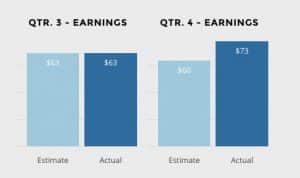
Data visualization is a powerful tool, and the Themify Builder Bar Chart Addon brings this capability directly into your WordPress website, especially when used in conjunction with Themify Builder. While its primary function isn’t direct form submission, it’s an invaluable addon for presenting form data in a clear and digestible format. Imagine collecting survey responses or poll results; this addon allows you to transform that raw data into compelling bar charts that are easy for your audience to understand.
This addon is perfect for reporting on form submissions, showcasing statistics, or visualizing trends. For example, if you have a feedback form, you could use this addon to display the distribution of satisfaction ratings. If you’re running a campaign, you might use it to show the number of sign-ups over time. The ability to create visually appealing charts directly within your website without needing external tools or complex coding is a significant advantage. It enhances the reporting capabilities of your forms and makes your data more accessible and impactful for your visitors or internal stakeholders.
5. Themify Builder Contact Addon
The core of many websites is effective communication, and the Themify Builder Contact Addon aims to simplify and enhance the process of creating contact forms. Designed to integrate seamlessly with the Themify Builder, this addon provides a straightforward way to add robust contact functionalities to your pages. It offers pre-designed elements and customization options that allow you to build professional-looking contact forms quickly and efficiently, without needing to dive into complex code.
This addon addresses the common pain point of creating functional yet attractive contact forms. Whether you need a simple “get in touch” form, a more detailed inquiry form, or even a basic lead generation form, the Themify Builder Contact Addon provides the tools to achieve this. Its integration with the Themify ecosystem means that styling and layout adjustments are intuitive, aligning with the overall design of your website. In 2025, where user experience is paramount, having an easily customizable and functional contact form is essential for capturing leads and fostering customer relationships.

Final Verdict: Choosing the Best WordPress Form Addons for 2025
As we look ahead to 2025, the importance of sophisticated and user-friendly form solutions on WordPress websites cannot be overstated. The addons reviewed here represent different facets of enhancing form functionality, from intricate conditional logic to improved user experience and powerful data visualization. For those deeply invested in the Gravity Forms ecosystem, Gravity Perks Conditional Logic Dates and Gravity Perks Preview Submission are indispensable for creating highly dynamic and error-free forms. They tackle complex scenarios with elegant solutions, saving time and improving data quality.
On the Themify Builder side, the Themify Builder AB Image Addon, Themify Builder Bar Chart Addon, and Themify Builder Contact Addon offer compelling ways to integrate visual appeal, present data effectively, and build essential contact functionalities directly within the builder environment. While they serve distinct purposes, together they highlight the growing trend of making advanced features accessible and easy to implement for WordPress users. Ultimately, the “best” form addon for you in 2025 will depend on your specific needs, your existing WordPress setup, and the level of customization you require. However, the products discussed in this review offer a strong starting point for anyone looking to elevate their WordPress forms.
These WordPress Plugins products represent the best options available in the market. Each has been carefully selected based on quality, features, and user reviews. Choose the one that best fits your needs and requirements.