Best WordPress Form Addons in 2026: Complete Guide & Reviews
In the dynamic world of website development, forms are the unsung heroes. They’re the gateways for user interaction, lead generation, customer support, and so much more. As we navigate 2026, the demand for sophisticated, flexible, and user-friendly form solutions on WordPress has never been higher. While the core WordPress platform provides basic functionality, it’s the power of plugins and their addons that truly unlock the potential of online forms. These extensions go beyond simple data collection, offering advanced features that can transform a static form into a powerful tool for business growth and engagement.
Choosing the right form addon in 2026 means looking for solutions that offer seamless integration with popular form builders, intuitive interfaces, robust conditional logic, advanced field types, and excellent support. The best addons should empower you to create complex, multi-step forms, personalize user experiences, automate workflows, and gather richer data without requiring extensive coding knowledge. This review article dives deep into some of the top WordPress form addons available today, evaluating their features, benefits, and how they can solve common pain points for website owners and developers alike. We’ll focus on practical applications and real-world scenarios to help you make an informed decision for your WordPress website in 2026.
Top WordPress Form Addon Reviews: Expert Analysis for 2026
The landscape of WordPress form addons is constantly evolving, with developers pushing the boundaries of what’s possible. In 2026, we’re seeing a continued emphasis on intelligent form design, enhanced user experience, and deeper integration with other business tools. This section provides an in-depth look at five standout form addons, ranked by their perceived quality and impact, offering honest insights into their strengths and how they can elevate your WordPress website.
1. Gravity Perks Conditional Logic Dates
When it comes to extending the already powerful Gravity Forms, the Gravity Perks suite stands out, and Gravity Perks Conditional Logic Dates is a prime example of their innovative approach. This addon specifically targets a common pain point: creating forms that dynamically adapt based on specific date conditions. For businesses that rely on time-sensitive offers, event registrations, or appointment scheduling, this plugin is an absolute game-changer. It allows you to show, hide, enable, or disable form fields, sections, or even entire forms based on whether a selected date falls within a specific range, is a particular day of the week, or meets other date-related criteria. This level of granular control ensures that your users only see relevant information and options, leading to a much smoother and more efficient form-filling experience.
The practical applications of Gravity Perks Conditional Logic Dates are vast. Imagine an event registration form where certain ticket types are only available for booking up to a week before the event, or where a discount code is only valid if the registration date is before a specific holiday. This addon makes such scenarios incredibly easy to implement. For a real estate website, you could show specific property viewing options only on weekdays, or for a service-based business, you could disable booking for a particular service on weekends. It also helps in preventing user errors by hiding irrelevant fields, thus reducing form abandonment and improving data accuracy. The intuitive interface, integrated directly within Gravity Forms’ conditional logic settings, means you don’t need to be a developer to leverage its power.

2. Gravity Perks Preview Submission
Another gem from the Gravity Perks collection, Gravity Perks Preview Submission addresses a critical aspect of form usability and data integrity: allowing users to review their entries before final submission. In 2026, user experience is paramount, and providing a “review” step can significantly reduce errors and increase user confidence. This addon empowers you to create a summary page where users can see all the information they’ve entered, exactly as they entered it, before committing to the submission. This is particularly invaluable for complex forms, applications, or any situation where accuracy is crucial, such as job applications, university admissions, or detailed order forms. By giving users a final chance to catch typos or incorrect selections, you drastically improve the quality of the data you collect.
The benefits of Gravity Perks Preview Submission extend beyond just error reduction. It also enhances user satisfaction by providing a sense of control and transparency. Users feel more confident submitting information when they have the opportunity to double-check it. This can lead to higher completion rates for your forms, as users are less likely to abandon a form due to a mistake they can’t correct. Furthermore, this addon can be a lifesaver for administrators. By reducing the number of submissions with errors, you save valuable time and resources spent on correcting or clarifying data. The setup is straightforward, integrating seamlessly with Gravity Forms, allowing you to easily enable a preview step and customize its appearance to match your website’s branding. It’s a must-have for any serious Gravity Forms user looking to optimize their form workflow.
3. Themify Builder AB Image Addon
While not strictly a “form addon” in the traditional sense of collecting data, the Themify Builder AB Image Addon plays a crucial role in enhancing the visual appeal and user engagement of forms, especially when integrated within the Themify Builder framework. In 2026, visually rich websites are the norm, and forms shouldn’t be an exception. This addon allows you to creatively integrate images within your form layouts, adding context, branding, or visual cues that can significantly improve the user experience. For example, you could use images to represent different product options in a selection field, provide visual examples for form fields, or simply add attractive graphics to break up the monotony of a long form. It’s about making your forms more engaging and intuitive.
The practical applications for the Themify Builder AB Image Addon are particularly relevant for e-commerce sites, portfolios, or any website where visual representation is key. Imagine a form where users select customization options for a product, and each option is accompanied by a clear image. Or consider a survey where different response choices are illustrated with relevant icons or photos. This addon makes it easy to implement these visual enhancements without needing to dive into custom CSS or complex coding. It empowers designers and content creators to build more dynamic and appealing forms that align with their overall website design. By making forms more visually appealing, you can capture user attention more effectively and guide them through the submission process with greater ease, ultimately contributing to better conversion rates and a more memorable user experience.

4. Themify Builder Bar Chart Addon
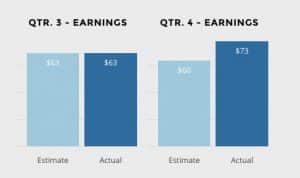
The Themify Builder Bar Chart Addon, much like the Image Addon, focuses on enhancing the presentation and understanding of data, which can be directly linked to form submissions. In 2026, the ability to visualize data effectively is more important than ever, and this addon allows you to transform raw data collected through forms into easily digestible bar charts directly on your WordPress website. This is incredibly powerful for displaying survey results, poll outcomes, performance metrics, or any other quantifiable data that your forms might collect. Instead of presenting users with a table of numbers, you can offer them a clear, graphical representation that is much quicker to understand and more impactful.
The practical benefits of the Themify Builder Bar Chart Addon are numerous for website administrators and content creators. If you’re running a campaign and collecting feedback via a form, you can instantly display the results of popular choices or opinions using bar charts. For businesses tracking sales or engagement metrics through forms, these charts provide a visual dashboard of progress. This addon integrates seamlessly with the Themify Builder, making it straightforward to create and customize charts. You can define the data sources, labels, colors, and other visual aspects to ensure the charts are not only informative but also aesthetically pleasing and consistent with your website’s design. It transforms your form data from a backend collection into an engaging frontend display, adding significant value to your content and user interactions.
5. Themify Builder Contact Addon
The Themify Builder Contact Addon is designed to streamline the creation and integration of contact forms within the Themify Builder environment. In 2026, having a robust and easily accessible contact method is fundamental for any website aiming to connect with its audience. This addon provides a dedicated solution for building contact forms that are not only functional but also visually integrated into your Themify-powered pages. It goes beyond basic contact fields, often offering features like spam protection, custom fields, and integration with email services, all managed through a user-friendly interface within the Themify Builder.
The real-world applications of the Themify Builder Contact Addon are widespread. For small businesses, it’s the primary channel for customer inquiries and lead generation. For larger organizations, it can be used for support requests, partnership proposals, or general feedback. The advantage of using an addon like this within Themify Builder is the cohesive design experience. You can ensure your contact forms perfectly match the look and feel of your website, maintaining a professional and consistent brand image. Furthermore, the ease of setup means that even users with limited technical expertise can quickly deploy effective contact forms, ensuring that potential customers or clients can easily reach out. This addon simplifies a critical aspect of website functionality, making it easier to capture leads and foster communication.

Final Verdict: Best WordPress Form Addon Choices for 2026
As we look ahead to 2026, the importance of sophisticated form addons for WordPress websites cannot be overstated. The products reviewed in this article represent a spectrum of functionality, from advanced conditional logic and user review capabilities to enhanced visual data presentation and seamless contact form integration. For users heavily invested in the Gravity Forms ecosystem, Gravity Perks Conditional Logic Dates and Gravity Perks Preview Submission are indispensable tools that significantly elevate form functionality and user experience, directly addressing common pain points like data accuracy and user frustration. Their ability to create dynamic, error-reducing forms makes them top contenders for any serious Gravity Forms user.
For those utilizing the Themify Builder, the addons reviewed offer distinct advantages. The Themify Builder AB Image Addon and Themify Builder Bar Chart Addon are excellent for enhancing the visual appeal and data comprehension of your website, making forms and their outputs more engaging and understandable. The Themify Builder Contact Addon, on the other hand, provides a streamlined and visually integrated solution for a fundamental website requirement – enabling users to connect with you. Ultimately, the “best” addon depends on your specific needs and the platform you’re using. However, the products highlighted here offer robust solutions that are well-positioned to meet the demands of WordPress form building in 2026, empowering you to create more effective, engaging, and data-rich online experiences.
These WordPress Plugins products represent the best options available in the market. Each has been carefully selected based on quality, features, and user reviews. Choose the one that best fits your needs and requirements.